Challenge Configuration
This section explains how to configure the main details of your EvalAI challenge in the challenge_config.yaml file. It includes challenge metadata, display settings, timeline, tags, and top-level files (evaluation scripts, images, HTML templates).
For ready to use end-to-end challenge configuration examples refer to this section.
Following fields are required (and can be customized) in the challenge_config.yml.
Challenge Metadata
title(required)Type:
stringDescription: The full name of the challenge displayed to users.
Example:
title: "Autonomous Driving Lane Detection Challenge"
short_description(required)Type:
stringDescription: A short summary (~140 characters) of the challenge.
Example:
short_description: "Detect lane boundaries from images in real-time."
description(required)Type:
string(relative file path)Description: Path to the full challenge description in HTML file format.
Example:
description: "templates/description.html"
evaluation_details(required)Type:
string(relative file path)Description: Path to a detailed explanation of the evaluation process in HTML file format.
Example:
evaluation_details: "templates/evaluation_details.html"
terms_and_conditions(required)Type:
string(relative file path)Description: Path to HTML file with challenge rules, licenses, restrictions, etc.
Example:
terms_and_conditions: "templates/terms_and_conditions.html"
image(required)Type:
string(relative file path)Description: Path to the challenge logo. Must be
.jpg,.jpeg, or.png.Example:
image: "images/logo/lane_detection_logo.png"
submission_guidelines(required)Type:
string(relative file path)Description: Path to HTML file with “how-to-submit” instructions.
Example:
submission_guidelines: "templates/submission_guidelines.html"
Challenge Timeline
start_date(required)Type:
datetime (UTC)Format:
YYYY-MM-DD HH:MM:SSDescription: When the challenge opens.
Example:
start_date: "2025-09-01 00:00:00"
end_date(required)Type:
datetime (UTC)Format:
YYYY-MM-DD HH:MM:SSDescription: When the challenge closes.
Example:
end_date: "2025-12-01 23:59:59"
Challenge Settings
published(optional)Type:
booleanDefault:
FalseDescription: Whether the challenge should become publicly visible after EvalAI admin approval.
Value:
True: Visible to all participants.False: Hidden until you’re ready to go live.
Example:
published: False
remote_evaluation(optional)Type:
booleanDefault:
FalseDescription: Whether submissions will be evaluated on a remote machine.
Value:
True: Evaluation will happen on external infrastructure you control.False: EvalAI will handle evaluation in one of the paid plan tiers.
Example:
remote_evaluation: False
Evaluation Script
evaluation_script(required)Type:
string(relative file path)Description: Folder containing the python scripts that will be used to evaluate submissions.
Example:
evaluation_script: "evaluation_script/"
To read more about evaluation scripts click here.
Leaderboard Configuration
leaderboard_description(optional)Type:
stringDescription: This is the description that appears above the leaderboard table on the challenge’s leaderboard page. It can explain what the leaderboard metrics mean, how the ranking works, or provide any other context you want participants to know when viewing the leaderboard.
Example:
leaderboard_description: "The leaderboard shows the evaluation results of your submissions based on accuracy and F1 score. The higher the score, the better your model performs."
leaderboard(required)Type:
list of objectsDescription: Defines leaderboard structure and metrics used for ranking.A leaderboard for a challenge on EvalAI consists of following subfields:
id: Unique positive integer field for each leaderboard entry
schema: Schema field contains the information about the rows of the leaderboard. A schema contains two keys in the leaderboard:
labels: Labels are the header rows in the leaderboard according to which the challenge ranking is done.default_order_by: This key decides the default sorting of the leaderboard based on one of the labels defined above.metadata: This field defines additional information about the metrics that are used to evaluate the challenge submissions.
Example:
leaderboard: - id: 1 schema: { "labels": ["Accuracy", "F1 Score", "Total"], "default_order_by": "Total", "metadata": { "Accuracy": { "sort_ascending": false, "description": "Overall accuracy of the model" }, "F1 Score": { "sort_ascending": false, "description": "Weighted F1 score over all classes" }, "Total": { "sort_ascending": false, "description": "Combined performance metric" } } }
The leaderboard schema will look something like this on leaderboard UI:
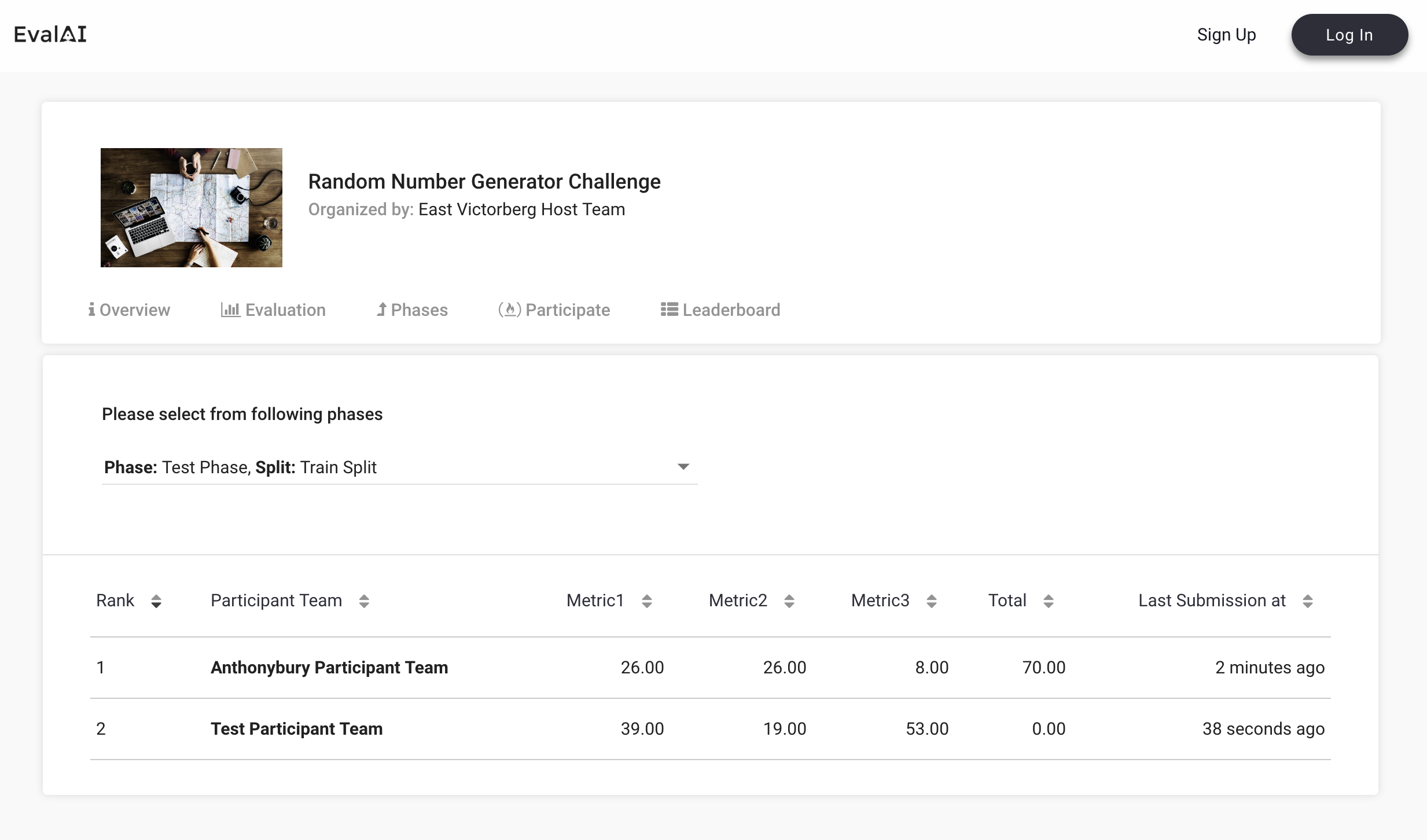
Example:
This is how the challenge configuration (excluding phases and splits configuration) of a sample challenge with all the above fields look like:
title: "Autonomous Driving Lane Detection Challenge"
short_description: "Detect lane boundaries from images in real-time."
description: "templates/description.html"
evaluation_details: "templates/evaluation_details.html"
terms_and_conditions: "templates/terms_and_conditions.html"
image: "images/logo/lane_detection_logo.png"
submission_guidelines: "templates/submission_guidelines.html"
leaderboard_description: "The leaderboard shows the evaluation results of your submissions based on accuracy and F1 score. The higher the score, the better your model performs."
evaluation_script: "evaluation_script/"
remote_evaluation: false
start_date: "2025-09-01 00:00:00"
end_date: "2025-12-01 23:59:59"
published: false
tags:
  - autonomous-driving
  - lane-detection
  - computer-vision
  - real-time-processing
leaderboard:
- id: 1
  schema:
    {
      "labels": ["Accuracy", "F1 Score", "Total"],
      "default_order_by": "Total",
      "metadata": {
        "Accuracy": {
          "sort_ascending": false,
          "description": "Overall accuracy of the model"
        },
        "F1 Score": {
          "sort_ascending": false,
          "description": "Weighted F1 score over all classes"
        },
        "Total": {
          "sort_ascending": false,
          "description": "Combined performance metric"
        }
      }
    }